
It understands rituals
A duty like "jog 3 times per week" is not shown in the list every day. It appears when the weekly quota becomes tight - and gets quieter when you already checked off two of them.
The Principle
Overdue| Anything that missed its deadline is highlighted at the top in red. In the evening you can move a task directly "to tomorrow" - then it will not be counted as forgotten.
Due today| Dates, duties (quests) or repetitions (rituals) for this exact day. Sorted by urgency, not by creation date.
From your pool| If there is no hard deadline today, the Today page suggests timeless tasks from your own pool. You can also show all quests from there.
With companions| Quests you share with others: shared work (alliance), assigned work (decree) or your own work visible to others (my duty). Everyone sees clearly who does what - no double work, no "I thought you were doing it".
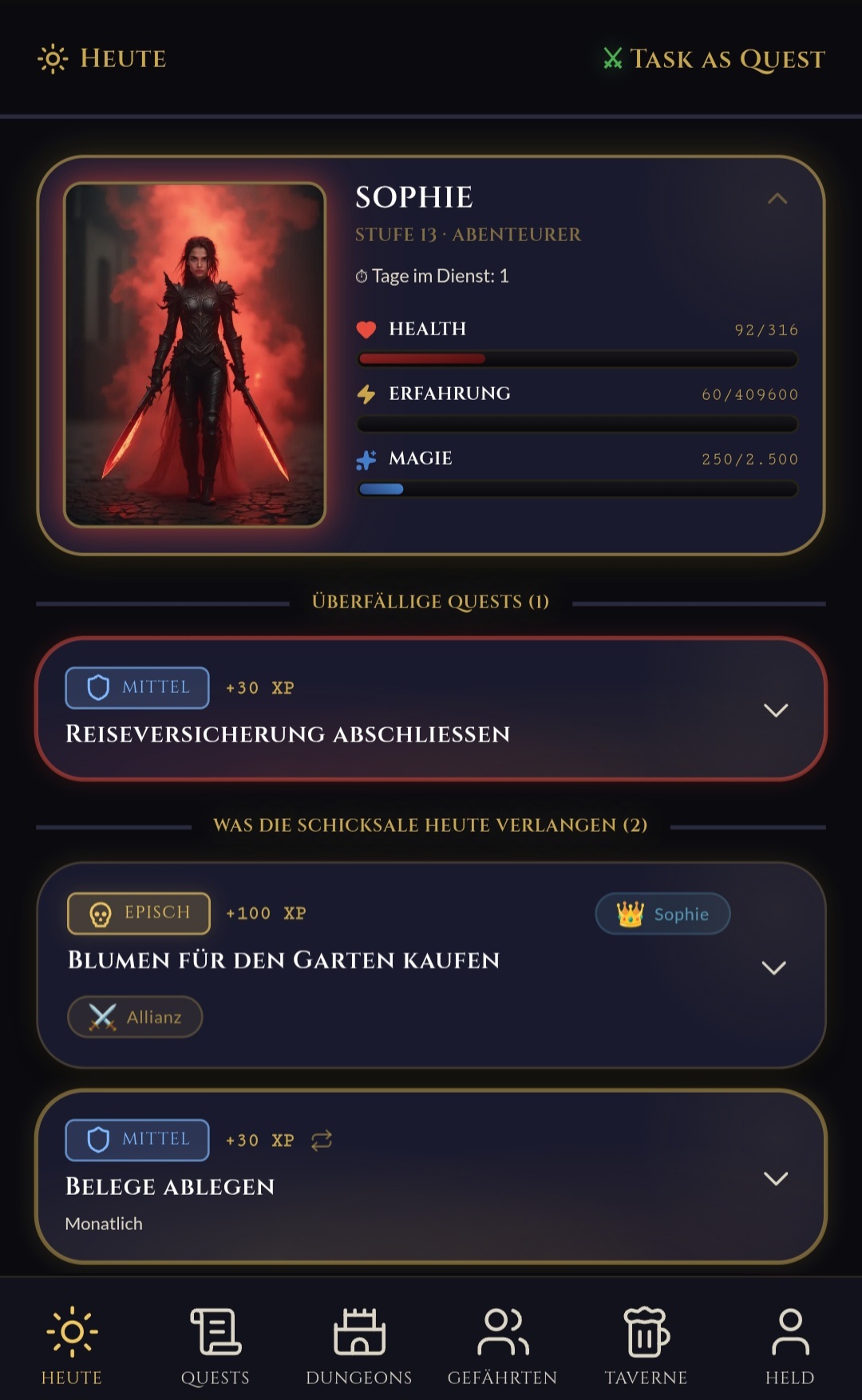
Five sections, in this exact order - and only when there is something inside. No empty boxes, no tabs to swipe through.
Everything that missed its deadline. Red, at the top, not hidden. So nothing sinks into the backlog.
Dates, rituals and duties for today. Sorted by urgency, not by creation date.
Up to three suggestions from your timeless pool - sticky for the day.
You do not constantly get a new selection, but the same choices until you tackle them or a new day begins.
What you share with companions. Alliance (shared), decree (handed off), duty (you see what others do).
Already done today. Folded at the bottom, for the small pride moment in the evening.
A duty like "jog 3 times per week" is not shown in the list every day. It appears when the weekly quota becomes tight - and gets quieter when you already checked off two of them.
If there is still enough buffer, the recurring duty simply stays hidden. You should not be greeted on Monday morning by a list that overwhelms you.
The closer the point gets where you need to act, the clearer the warning becomes. Last day with an open quota = clear warning. More tasks than days left = critical. Before that: calm.
When the must-do work is done and there is little left, it suggests three timeless quests from your pool. Sticky for the day - so you do not keep drawing the same choice over and over.
A morning greeting with what slipped yesterday and what XP penalties it cost. An evening warning when hard duties are still open. Both can be switched off.
No tabs. No filters. No 47 lists. One page that looks different this morning than yesterday - and different again tomorrow.
TaskAsQuest does not have a fixed "visibility slider" and no table you have to maintain yourself. The visibility of a recurring ritual is derived from three values: how many tasks per period, how many you have already completed, and how many days are left. From that, the app calculates automatically: too early / normal / warning / critical.
A quota of 3 per week behaves differently from 6 per week. A once-per-month duty behaves differently from a weekly ritual. The app does that math for you - you only decide what the quota should be.
Essence
That means you can say "3 times a week" without locking it to Mon/Wed/Fri. If you put it rigidly into the calendar and miss Monday, Tuesday already feels bad. Here it is distributed dynamically over the week. Of course you can still place rituals on fixed days - like "take out the bin", because that one is not exactly dynamic.
Visible progress
You now know the principle. Around it, TaskAsQuest wraps a small story: XP, classes, companions, hero images. If you like that, you can lean into it. If you do not need it, switch it off and keep a clean list. Here is who it is for and what kind of tone it can have.
If you like fantasy, heroes and quests, TaskAsQuest feels like an RPG you play on the side while getting real things done.
Put it into the app, assign it to a companion, add a time - done. When the time comes, the app sends the reminder automatically, even if you forgot it yourself.
Share quests with your companions - together, handed off, or just visible. Quest contents are end-to-end encrypted; dates and status remain readable for technical reasons.
XP for every success, a character that grows, skill tree, achievements. If points motivate you - this is your sandbox.
You want to "jog 3 times per week" - but not rigidly on Mon/Wed/Fri. You set the quota, the app distributes it dynamically through the week. If Monday fails, Tuesday is not a disaster.
Hosted on a German server. No ads. No tracking. No cloud at US providers. Quest contents are end-to-end encrypted. Privately run.
TaskAsQuest has two worlds - you can switch freely between them, and your character remains the same.
Full fantasy. Tasks are quests. Routines are rituals. XP, hero, class.
Sober. Plain. For when you are not in the mood for dragons.
Get Started
Open TaskAsQuest directly as a web app or install it as a PWA. On Android you have two options: use Google Play or download the APK directly without Google. On iPhone, use the web app in your browser for now — a native iOS app is currently beyond my private budget.
Before you go
TaskAsQuest is free and ad-free. I pay for server, domain and power myself. If you like the app, a small gesture of support means a lot — and of course you can continue without one.